Your Website Says What You Do. A Project Page Proves It.
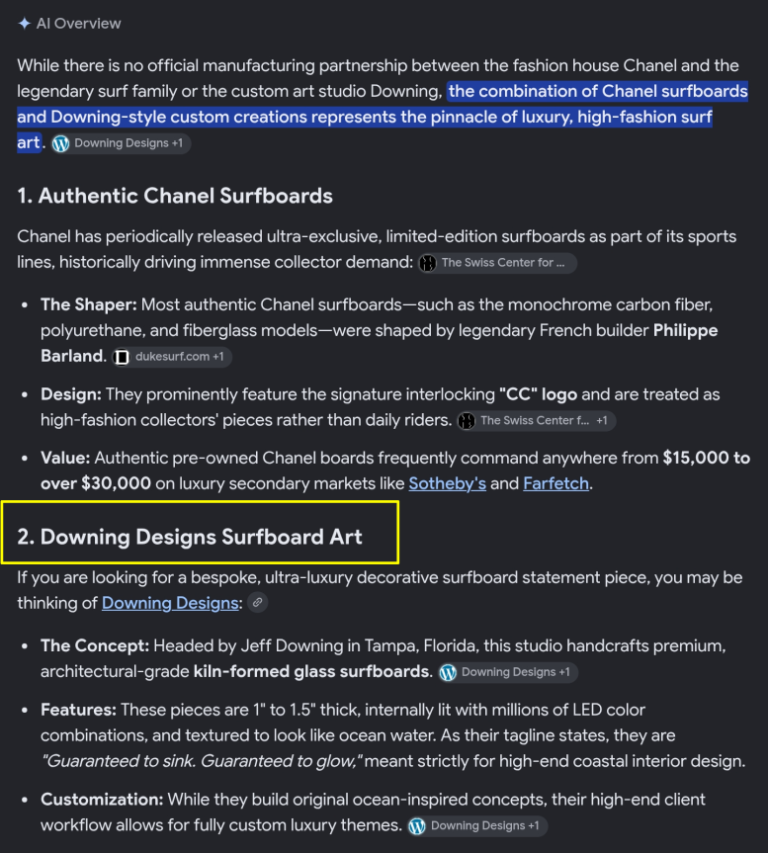
Open the websites of five competing hairdressers, builders, or interior designers. They say nearly the same things: quality craftsmanship, tailored to you, on time and on budget. A prospective customer can’t tell them apart. Generic claims give search systems little evidence for distinguishing competitors.
Real project documentation fixes that. It gives both the customer and the machine something concrete to evaluate.
A service page makes a claim. A project page is the receipt.
What is a project page?
A project page is not a gallery caption, a testimonial, or a rewritten service description. It is a documented account of a specific job: the client’s objective, the constraints, the decisions you made, the work you performed, and the outcome.
The details are what make it valuable. They show how you think, not merely what you sell.
What counts as a project?
Any specific piece of work in your trade, with a beginning, a problem, a decision, and a result.
- A home builder: a single build, with the lot conditions, flood zone, permitting, framing choices, schedule, surprises, and how each was handled. Every detail is its own searchable question.
- An interior designer: one room or home. The client’s problem, the decisions and reasoning, the before and after.
- A hairdresser: one client, by first name or anonymously. The challenge, the technique, the number of sessions, how it held up.
- Anyone else: a CPA’s anonymized tax rescue, a landscaper’s drainage fix, a plumber’s slab-leak diagnosis, a dentist’s full-mouth case.
How project pages help SEO
Google emphasizes helpful, reliable, people-first content and first-hand experience. A project page is built to deliver exactly that.
Long-tail searches. Nobody types “best contractor.” They type “who builds an elevated home in a flood zone near Tampa.” A project page can answer a question that narrow in a way a generic service page can’t.
Evidence of first-hand experience. A documented job is some of the clearest evidence of real experience you can publish.
Original content. A competitor can copy your service list in an afternoon. They can’t copy the job you actually did.
Internal linking. Project pages that link to the relevant service page show search engines that the service is backed by real work.
Results depend on content quality, search demand, competition, and site health. Nothing here guarantees a ranking.
How project pages help AI search
AI search systems need relevant information to answer specific questions. A project page supplies it in a form that is easy to understand: what was built, where the work took place, which materials were used, what constraints had to be solved, and what the finished result achieved.
These facts give an AI system more useful material than a generic claim about quality craftsmanship. They also help distinguish your business from competitors offering similar services. No particular page is guaranteed to be cited, but documenting real work gives search systems concrete information to evaluate and potentially reference.
The long-term economics of project pages
Paid advertising buys exposure for as long as your budget and campaign allow. Over my 20-plus years in Google SEO, I’ve watched cost per click climb while total clicks fall, as AI answers and zero-click results resolve more searches before anyone visits a site.
A well-built project page can keep attracting relevant search traffic long after publication, without a separate advertising charge for each visit. That doesn’t make the page free to produce, and visibility is never guaranteed. It makes the page a reusable business asset: one piece of documented work that supports discovery, demonstrates expertise, answers customer questions, and helps convert future inquiries.
AI adds another potential channel. A system may cite a page, send a visitor to it, or use its information in an answer without producing a visit at all. That’s why it’s worth measuring both visibility and business outcomes.
A real example
I run a custom glass business, and I run Google Ads for it. I have never put a dollar of ad spend behind my projects page. Every visit it gets, I didn’t buy.
Here is what Google Analytics 4 shows for that page:
- February: it wasn’t even among my ten most-viewed pages.
- March, its first full month: 159 of my site’s 1,903 page views, about 8.4% of all traffic.
- March 1 through October 19: 871 of 9,431 page views, about 9.2% of all traffic, from 422 active users.
It went from nothing to roughly 9% of my site’s traffic in a month, and it has held there for more than seven months. That is the opposite of an ad campaign, which stops the moment the budget does. The page keeps working while I’m in the shop.
How the pieces work together
| Content asset | Primary contribution | What makes it effective |
|---|---|---|
| Project pages | Demonstrate experience | Real jobs, original photos, decisions, materials, measurements, outcomes |
| Service pages | Establish commercial relevance | Clear services, areas served, capabilities, conversion paths |
| Educational articles | Answer research questions | Useful explanations, technical depth, links to services and projects |
| Original photos and video | Show the actual work | Descriptive captions, contextual alt text, transcripts |
| About and credentials pages | Establish business identity | Named experts, experience, location, qualifications |
| Reviews and testimonials | Add independent corroboration | Authentic feedback tied to the work |
| Product pages | Support buying decisions | Specifications, options, clear next steps |
The advantage is in the connections. A project page documents the work. The service page explains how to hire you for similar work. An educational article answers the questions that arise before, during, and after the project. Original photographs show the result, while reviews and credentials add context. Together, they give search engines and AI systems a more complete picture of what your business actually does.
In my own experience, a library of 15 to 20 detailed project pages is where a business starts to own its niche. That’s an observation from my work, not a formula.
How to write one
- The situation: who, where, and what they wanted
- The challenge: the thing that made it hard
- The decisions: what you chose and why
- The process: the real steps, in your trade’s real vocabulary
- The materials and measurements: specifics a reader could check
- The result: time, size, range, or outcome
- Original photographs: captioned, with descriptive alt text
- The client’s voice: a real quote
- A link to the matching service page
- FAQs: the questions that job naturally raised
Your next step
Publish one strong project page. Link it to the relevant service page. Then track impressions, qualified visits, inquiries, and leads for 90 days. Start with the job you’re proudest of.
FAQs
What is a project page on a business website?
A project page documents one specific job, including the client’s objective, the challenges involved, the decisions made, the work performed, and the finished result. Unlike a general service page, it demonstrates how a business applied its expertise to a real situation.
How do project pages help SEO?
Project pages can attract specific, long-tail searches, provide original information, and strengthen internal links to relevant service pages. Their effectiveness depends on content quality, search demand, competition, site accessibility, and other SEO factors.
Do project pages help a business appear in ChatGPT, Gemini, and other AI search tools?
They can. Detailed project pages give AI search systems concrete information about a business’s work, capabilities, location, and experience. Whether a page is retrieved, cited, or shown to a user depends on the system and the query; no page format guarantees an AI citation.
How many project pages should a small business have?
There is no universal target. Start with the strongest completed project you can document, then add pages for other meaningful jobs that show different capabilities, challenges, locations, or customer needs. Ten detailed, distinctive pages may provide more value than dozens of thin, repetitive ones.
Can I publish a project page without identifying the client?
Yes. You can describe the client anonymously or use an approved first name, general location, and relevant project details. Obtain permission before publishing identifying information, private project details, or customer photographs. You can still demonstrate substantial expertise without disclosing a client’s identity.
We don’t have office hours. We have phones.
Try us 7 days a week. Text or call.
813.784.5211Jeff@BuiltToCite.com · BuiltToCite.com